 Auto Timesheets
Automatic timesheets for construction crews
Crew turn up. Timesheets fill themselves in.
Your crew's phones record when they arrive at a job and when they leave. You review the week, sort anything that needs a look, and send approved hours to payroll. No more chasing scrappy timesheets on a Monday morning.
No daily clock buttons. No timesheet forms.
Talk to us about a pilotSee how it works
$15 + GST per person, per month. Pilot businesses get 14 days free, no card.
Simple on purpose.
We do one thing: timesheets by location. No clocking on every day, no forms, nothing for your crew to remember.
Nothing to do each day
No daily clock buttons, no job to pick, no timesheet to fill in. Set up once: install the app, join, accept your notice and allow location. After that, turning up is the timesheet.
You look, tick, send
Open the week, check anything that needs a look, approve it and export it for payroll. Less chasing, less checking.
No roster to keep up
You can plan who's where, but you don't have to. Once a job is set up with its pin confirmed, the phones pick it up when they get near, so a last-minute change doesn't mean rebuilding a roster.
Less to set up. Less to teach.
How it works
Pin the job
Punch in the address, drop a pin on the site and confirm it on the map. Nothing runs off a pin nobody has checked.
Crew rock up
After a one-off phone setup, arriving at a job and leaving it is recorded for you. No paperwork, no remembering.
Review, then send to payroll
Check the hours, sort anything unusual, approve them and export them for payroll. Pay rates and overtime stay in your payroll software.
What your crew sees. What you see.
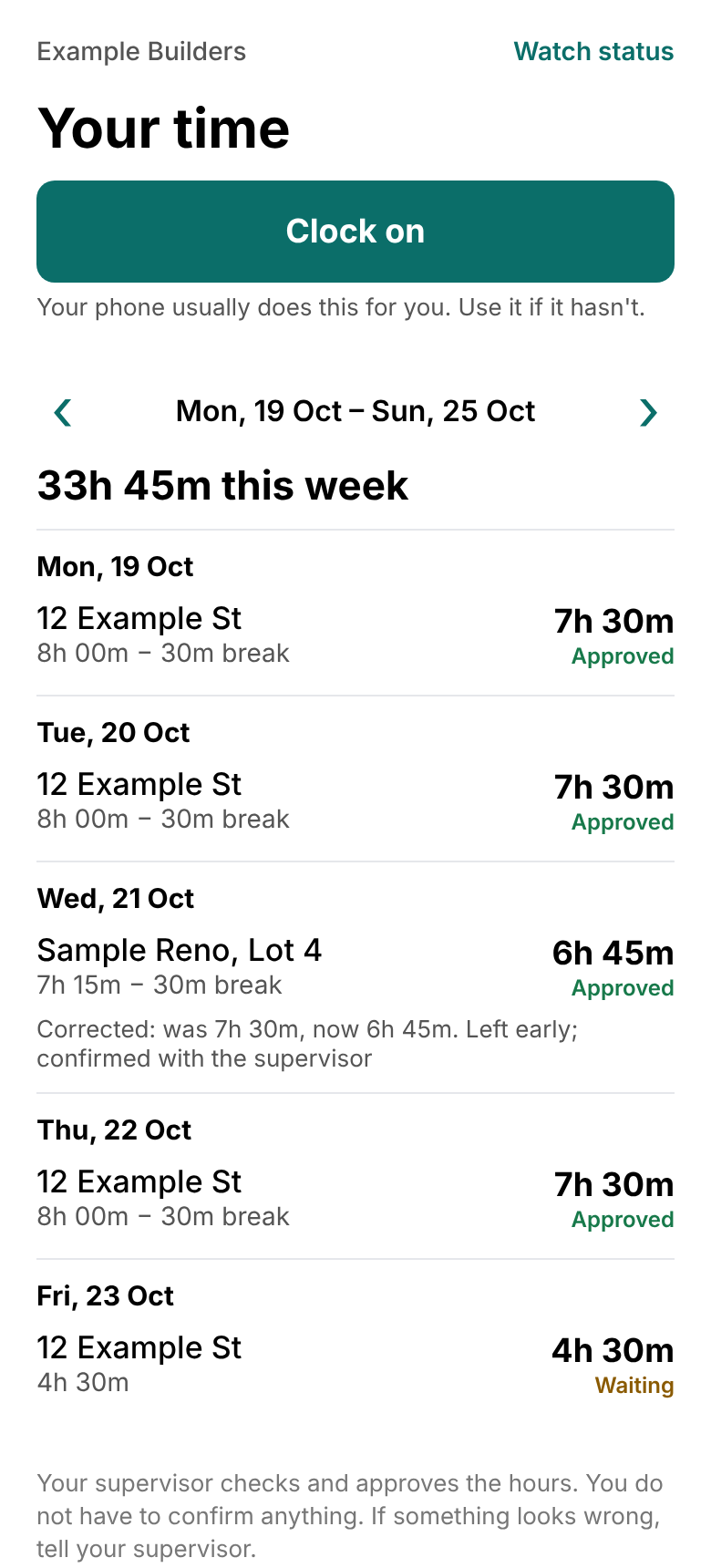
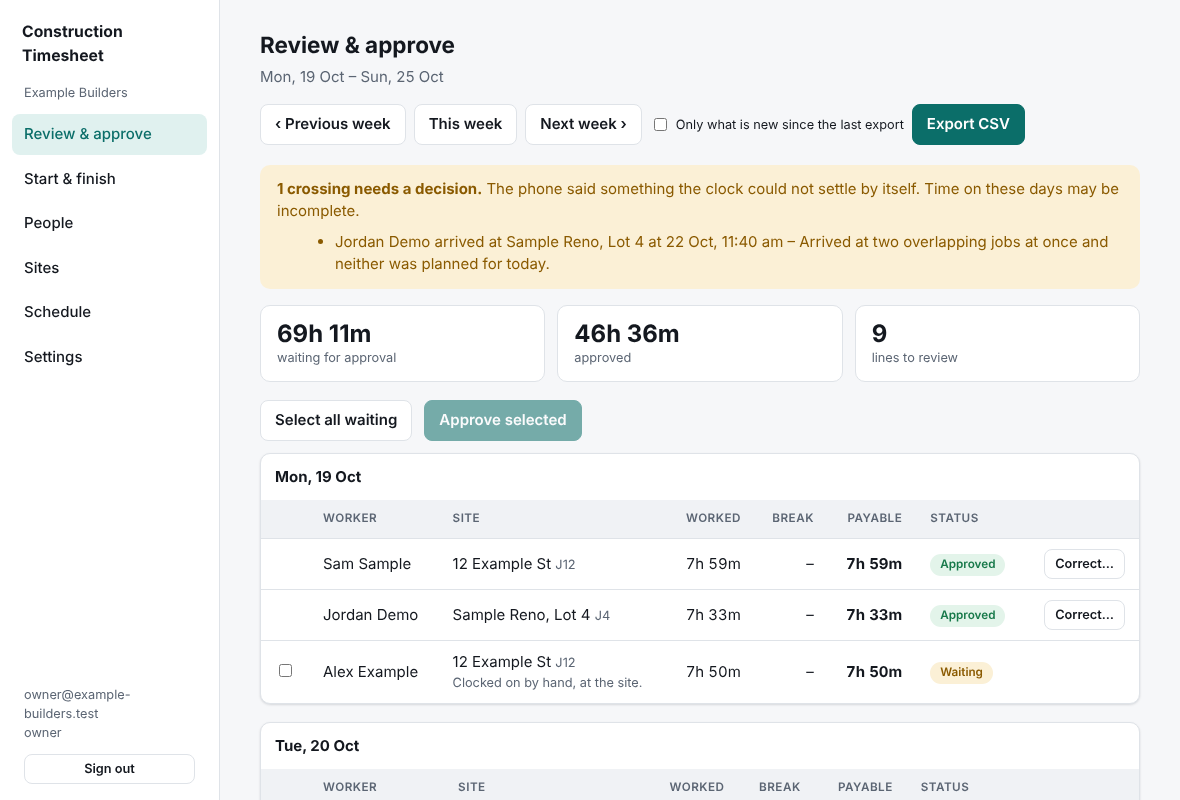
Real screens from the app, with made-up people, jobs and hours.
One minute a day covers the cost.
It's $15 + GST per person, per month. At $45 an hour, that's about twenty minutes of one worker's time a month, roughly a minute each working day.
+ GST, per person, per month.
a day each is break-even, at $45 an hour.
a month of time in the example below, for 10 people. An illustration, not a promise.
Most of the saving is less chasing: no blank timesheets on a Monday, no guessing who was where. Being on site isn't always paid working time, so travel, off-site work and breaks still need a look.
Work it out for your crew
Starts with an example: 10 people at $45 an hour, each paid 10 minutes a day they didn't work and spending 10 minutes a week on timesheets. Put in yours.
About $1,986 a month in time, against $150 + GST.
Office timesheet work: $361. Hours paid but not worked (your estimate): $1,625.
On these numbers that's about $13 of time for every $1 of subscription, or $1,836 a month after it.
It pays for itself if each person gets 0.9 minutes a day back at $45 an hour. $15 + GST per person per month.
An illustrative estimate from the numbers you enter, not a promise. Results depend on your crew, your wages and how you pay them, and being on site isn't always paid working time.
Built for tradies, not the office
Sent to another site?
If that site is set up with its pin confirmed, the hours land on the site they actually turned up at, not the one on the roster.
Just driving past?
A quick pass by the gate isn't a start. Short visits are filtered out, and you set how long someone has to stay for it to count.
Two jobs close together?
Where two sites overlap, the job planned for that day is used to settle it, and anything the system can't decide is flagged for you to look at.
Stuffed up? Fix it, keep the receipts
Correct a day's hours and the old figure stays on file with who changed it and why. The worker can see it too.
You approve it
A supervisor approves the time, and never their own. For clean days with nothing unusual you can turn on automatic approval. Anything flagged waits for a person.
Smoko your way
Set your unpaid breaks once. A site that starts at six can have its own start and finish.
Your crew get told first
Publish your notice and each worker reads it on their own phone and accepts it before anything's recorded for them. You can see who has and who hasn't. The app records where a phone is when it arrives at or leaves a job site, not a continuous route.
Workers can see their own week in the app, including anything that got corrected and why. Keeps everyone straight with each other.
Pricing
One price per person, per month. Everyone on your active crew list counts. Add someone when you take them on; archive them when they leave and they stop counting.
It's $15 + GST per person, per month. Pilot businesses start with 14 days free.
Questions
What does each worker need to do?
Once: install the app, join your business with the code you give them, read and accept your notice, and allow location (set to always, so it works with the app closed). After that there's nothing to do on a normal day.
What location does it collect?
Where the phone is when it arrives at or leaves a job site, with the time. It's not a continuous route, and the app doesn't keep a trail of where anyone goes in between.
Can I legally track my crew's location?
You've got to tell your workers in writing first, and the rules change from state to state. The app makes every worker read and accept the notice you publish before it records anything for them, and keeps the record of who accepted what. That helps, but it doesn't replace your own obligations as an employer. We give you wording to start from; get your own adviser to check it.
What if a phone is flat, offline or location is switched off?
Your phone usually clocks you on and off. If it hasn't, there's a Clock on button in the app: one tap when you're at the job, two if the app needs you to pick which one. The office can see it was done by hand. The phone saves arrivals and departures and sends them when it's back online, and we're proving that on real phones in the pilot. If nothing at all is recorded for a day, the office can't add that time in the app yet, so we'll sort it out with you directly while we pilot.
Which payroll exports work today?
A spreadsheet (CSV) that most payroll software can import, and a timesheet file in MYOB's import layout. We haven't tested the MYOB file against a live MYOB yet, so we'll do that with you first. Rates, overtime and allowances stay in your payroll software; we only send approved hours. There's no direct Xero connection yet.
What if I put the pin in the wrong spot?
You confirm each pin on the map before it does anything. Move it and it asks you to confirm again.
Where's my data?
Your timesheet records are stored in Sydney. Some of the services we use, like address search, are run by other companies and may handle information elsewhere. The Privacy page lists them.
Are the phone apps available now?
Not in the app stores yet. We're building them for iPhone and Android and bringing a few businesses on at a time for a pilot. Talk to us and we'll get your crew set up.
Talk to us about a pilot
Ask us anything, or tell us about your crew and we'll show you how it'd go for you.